

Policy Management Page#
Tip
You can configure the ClusterWareAI ™ software to work with Keycloak. After completing the configuration, the Policy Management page appears in the ClusterWareAI GUI. See Integrating Keycloak with ClusterWareAI for details.
Use the Policy Management page to review Keycloak settings, link to Keycloak, and update Keycloak-to-ClusterWareAI role mapping. Additional actions related to Keycloak require the configctl command.
The page is available via User Management > Policy Management in the left navigation panel.
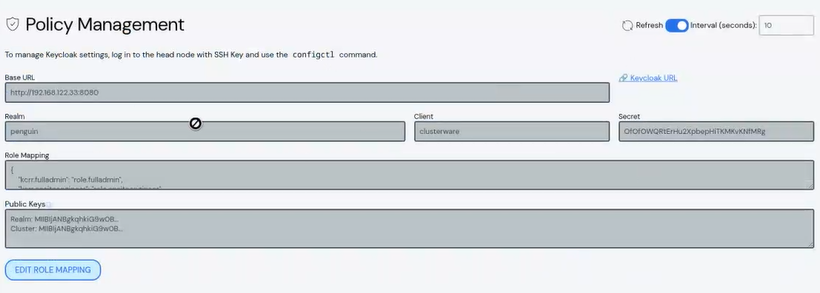
Edit Role Mapping#
Caution
While it is possible to modify the Keycloak-to-ClusterWareAI role
mapping from the ClusterWareAI GUI, it is typically recommended to do so via
the configctl tool. A misconfiguration via the GUI could log you out of
the system and require using the configctl tool to fix the problem. See
Configure Keycloak Roles in ClusterWareAI for details.
To update the Keycloak-to-ClusterWareAI role mapping:
Click Edit Role Mapping.
Update the role mapping between Keycloak and the ClusterWareAI roles using the following format:
"<Keycloak role name>":"<ClusterWareAI role name>"
Click Save to modify the role mapping.