

ClusterWareAI Overview#
The ClusterWareAI ™ platform simplifies the installation, deployment, administration, monitoring, and management of artificial intelligence (AI) and high-performance computing (HPC) clusters. The ClusterWareAI platform is hardware-agnostic and integrates bare-metal machines, networking, and software resources into a unified computing environment. You can use the ClusterWareAI software to manage your cluster via command line interface (CLI) tools or via a browser-based graphical user interface (GUI). You can also extend the software using ClusterWareAI APIs.
The following sections introduce various ClusterWareAI concepts by first describing a basic cluster scenario and architecture and then expanding to more advanced cluster scenarios.
Basic Cluster Architecture#
The following diagram illustrates the basic ClusterWareAI architecture.
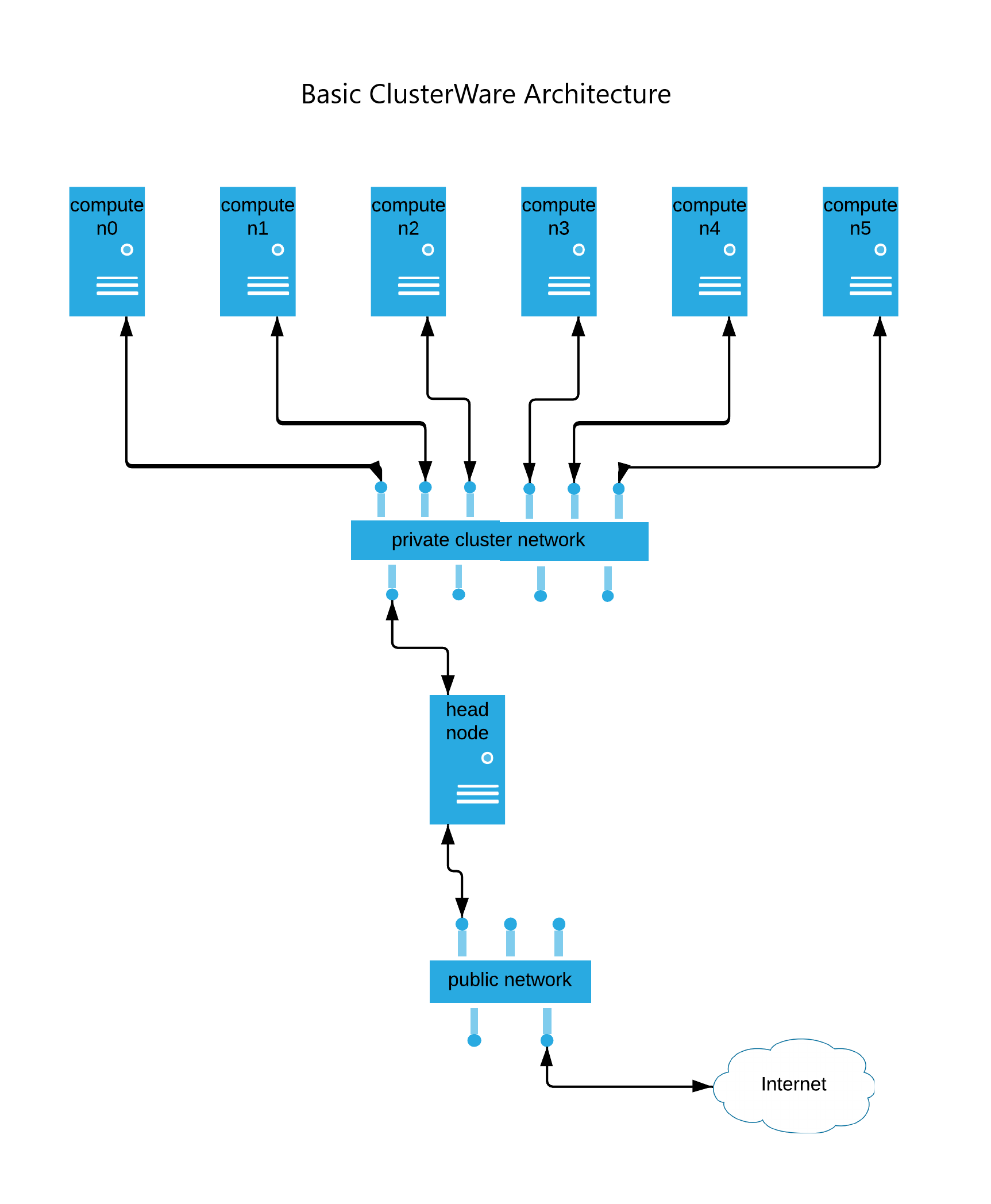
In a basic ClusterWareAI cluster, you have a single Head Node connected to a network of one or more Compute Nodes. Optionally, you can have a Login Node for users to access the compute nodes and Storage for application data.
Head Node#
A head node is a virtual machine where most cluster administration activities take place. The head node is responsible for provisioning compute nodes, collecting and displaying compute node status information, monitoring compute nodes via Grafana or other tools, and storing other cluster data, such as operating system (OS) images or attributes.
Within the head node, you can access and modify the cluster either using the
ClusterWareAI CLI tools, which commonly use the prefix
cw-, or using the ClusterWareAI GUI, which is
accessible via http://<HEADNODE_IP> in a browser. In most cases, you can
take the same actions with either the CLI or GUI.
Compute Nodes#
Compute nodes are CPU- or GPU-based bare metal systems where end user applications run. User applications are often distributed across compute nodes and coordinated by a job scheduler, such as Slurm. Commonly, HPC workloads run on a CPU-based cluster and AI workloads run on a GPU-based cluster. A ClusterWareAI cluster can have thousands of compute nodes that include CPU nodes, GPU nodes, or a combination of both.
ClusterWareAI compute nodes are typically added to the cluster using their MAC address. You can provide a list of node MAC addresses during initial installation and configuration of your cluster or add nodes later as your cluster expands and changes.
Each compute node is represented by a uniquely identified node object, also known as a primitive, in the ClusterWareAI database. This primitive contains the basics of node configuration, including the node's index and the MAC address that is used to identify the node during the DHCP process. Additionally, you can set an explicit IP address for each node. The node's IP address should be in the DHCP range configured during head node installation. If no IP address is specified, then a reasonable default is selected based on the node index. ClusterWareAI packages are installed on all compute nodes so they can communicate with the head node.
Login Node#
The login node is a system where end users can prepare job inputs, submit a job to the cluster, view a job's status, and review job results. The login node is connected to a public network to allow end users access.
Although a login node is technically optional, it is highly recommended for ClusterWareAI clusters. See Create Login Nodes for details.
Storage Server and Storage#
Many clusters include a shared network file system for storing computational data and job results. In some cases, compute nodes may not have a local disk and instead store all data in the shared network storage. Like a login node, network storage is technically optional but is recommended for most clusters.
Cluster Workflow#
Typical cluster activities include:
Provisioning compute nodes.
Creating, managing, and deploying bootable node images via boot configurations.
Monitoring cluster status for potential health and performance issues.
Managing the cluster, including job access, node image updates, and so on.
Maintaining cluster security with administrator access controls and other regulatory methods (if needed).
Provision Compute Nodes#
At the highest level, any system that fulfills the following requirements becomes a ClusterWareAI compute node:
The system is on a network where it and a ClusterWareAI head node can communicate with each other over TCP/IP. This is usually a local network.
The system is defined as a node on a ClusterWareAI head node by giving the head node the system’s MAC address and IP address.
The system has the appropriate ClusterWareAI node packages installed.
With these requirements fulfilled, the ClusterWareAI head node can send administrative commands to the node and the node is able to send status messages and telemetry back to the head node.
Generally, ClusterWareAI nodes fall into two categories: ClusterWareAI-Provisioned Nodes and Self-Provisioned Nodes.
ClusterWareAI-Provisioned Nodes#
On power-up, ClusterWareAI-provisioned systems automatically discover available ClusterWareAI head nodes on the network via a built-in DHCP server. The systems then PXE boot (network boot) the OS image served to them by the head node. ClusterWareAI can serve different images to different nodes based on their MAC address. PXE-booted nodes are either ephemeral or persistent.
Ephemeral Booting
RAM Boot: Nodes that boot from RAM are common for HPC clusters where you are looking for the most CPU power across the cluster at the lowest cost. It is fast to deploy the image and boot the OS from RAM, but you are sacrificing some RAM space (1 – 8 GB or more) to the OS.
The PXE boot OS image is decompressed into a tmpfs filesystem (stored in memory). OS images served by ClusterWareAI to booting nodes automatically have the required ClusterWareAI node packages installed. Once booted, the node immediately becomes active as a ClusterWareAI node, regularly sending status updates and telemetry to the head node.
On reboot or power-off, the contents of the RAM disk are cleared. The node PXE boots and re-downloads the OS image again the next time it boots. By re-installing the OS image at each reboot, the node always deploys the same known good image in the same way. This also guarantees that the node has all required software and is configured as expected.
Nodes that boot from RAM may or may not have a hard disk for local storage. If RAM boot nodes have a local storage disk, the OS image is still deployed and booted from RAM. The local storage disk can be used as extra storage for application data or calculations. You can set up the nodes to wipe the local storage at boot time, which is useful for sensitive data.
Disk Boot: For nodes that boot from a local storage disk, the PXE boot OS image is decompressed to the hard disk and run from there. On reboot or power-off, the node PXE boots and re-downloads the OS image again, overwriting the previously saved image.
A benefit of this technique is that, by storing the OS on the hard disk, more RAM is available for compute tasks while still enabling a reboot to bring the system to a known good state.
For either a disk boot or a RAM boot node, you can set up the node to boot from cache rather than re-downloading the image for every reboot. Cache boot nodes have a partitioned local disk with a partition set aside for an image cache. During the first boot, the node saves the image from the head node to the image cache. The OS is installed on either a local disk or RAM. On subsequent reboots, a checksum of the saved image is used to see if the image is identical to the one being served by the head node. If identical, the node avoids re-downloading the same image and extracts the cached image to disk and runs from there. Configuring nodes to boot from local cache can save time and network bandwidth, particularly if you are regularly booting multiple nodes simultaneously.
Persistent Booting
Persistent booting nodes operate similarly to disk boot nodes, except once the PXE boot OS image is downloaded, it is installed to the local hard disk together with a boot loader. Subsequent boots do not need network access to the head node and instead boot directly from the installed OS image on the hard disk. The OS image and data it contains are retained across reboots and power-off events.
If a node has local storage that is not being used to store a persistent OS image, you can configure ClusterWareAI to wipe this local storage at boot time, erasing potentially sensitive data.
Persistent provisions are recommended for infrastructure nodes, like the login node or storage server, where data needs to remain available. Persistent provisions are not recommended for compute nodes because they can lead to inconsistent configurations across the compute cluster. Persistent booting can be done with Ignition or Kickstart, though Ignition is recommended.
Note
Some GPU hardware manufacturers may require persistent booting as part of a license agreement. Consult with your hardware provider to learn about boot style support.
See Node Boot Style for more information about configuring how a node boots.
Self-Provisioned Nodes#
A self-provisioned node has the OS installed manually, usually on local storage, followed by the manual installation of the ClusterWareAI node packages. Once defined in ClusterWareAI by their MAC and IP address, they become functioning members of the ClusterWareAI cluster. While straightforward, this is not the typical way nodes in a cluster are provisioned.
Manage Boot Configurations#
Boot configurations are configurable ClusterWareAI primitives stored on the head node. Boot configurations are used to set up the PXE booting process and are assigned to any PXE boot node. For example, the boot configuration sets up whether a PXE booting node extracts the the downloaded OS image to RAM versus a local hard disk.
Configurable boot configuration parameters include:
Which kernel to serve to the booting node.
Which initramfs to serve to the booting node.
Which OS image to serve to the booting node.
Which kernel command line arguments to pass to the booting node.
How the node should configure itself after PXE booting the served image (disk boot, diskless, persistent, and so on).
When a ClusterWareAI head node receives a PXE boot request from a booting node, it uses the booting node’s MAC address to look up the node’s assigned boot configuration and boots the node according to that configuration. At a lower level, the head node first serves the node its assigned kernel and initramfs. The node runs the kernel and then runs the contents of the downloaded initramfs. The initramfs is then responsible for continuing communication with the head node using higher-level protocols such as HTTP. The initramfs requests the full OS image from the head node as well as the configuration parameters that are set in that node’s assigned boot configuration. The initramfs uses these parameters to determine how to process the downloaded OS image.
Monitor Status#
After a node boots, it continues to relay status data to the ClusterWareAI head node at regular, configurable intervals (every 10 seconds by default). You can monitor node and overall cluster status via the ClusterWareAI CLI tools or the GUI. Node status values include NEW, UP, DOWN, and ALERT and are color-coded in the ClusterWareAI GUI for easy scanning.
ClusterWareAI uses Telegraf and InfluxDB to report and collect telemetry data, which can be visualized using Grafana. Pre-configured Grafana dashboards are available or you can create your own custom dashboards. See Grafana Telemetry Dashboard to learn more.
Manage Cluster#
A cluster administrator may have ongoing management activities in addition to monitoring the cluster’s status. For example, you may need to update and redeploy images to sets of nodes as cluster user needs change. Depending on your cluster configuration, you may also need to set up and monitor a job scheduler, such as Slurm, or a container environment, like Kubernetes.
Maintain Security#
The ClusterWareAI platform supports role-based access control for cluster administrators. You can optionally integrate with Keycloak for alternate access control and user management.
For clusters with advanced security needs, the ClusterWareAI software provides Security Technical Implementation Guides (STIG) support for kickstarted nodes for compliance with Defense Information Systems Agency (DISA) guidelines. The ClusterWareAI platform also supports Security-Enhanced Linux (SELinux) and Federal Information Processing Standards (FIPS) on head and compute nodes.
Advanced Cluster Scenarios#
The ClusterWareAI platform supports a variety of cluster architectures beyond the basic scenario described above. Some common advanced scenarios include:
High Availability: Cluster with improved availability via multiple head nodes.
Advanced Networking: Cluster with additional networking, internet access controls, and other advanced features.
Multi-tenant: Super-cluster that manages multiple smaller isolated clusters. Requires a special ClusterWareAI license.
High Availability#
High availability (HA) clusters contain three or more head nodes, allowing the cluster to tolerate the failure of a head node in the event of hardware or network failure, power loss, or other unexpected events.
The following diagram illustrates a HA ClusterWareAI architecture.
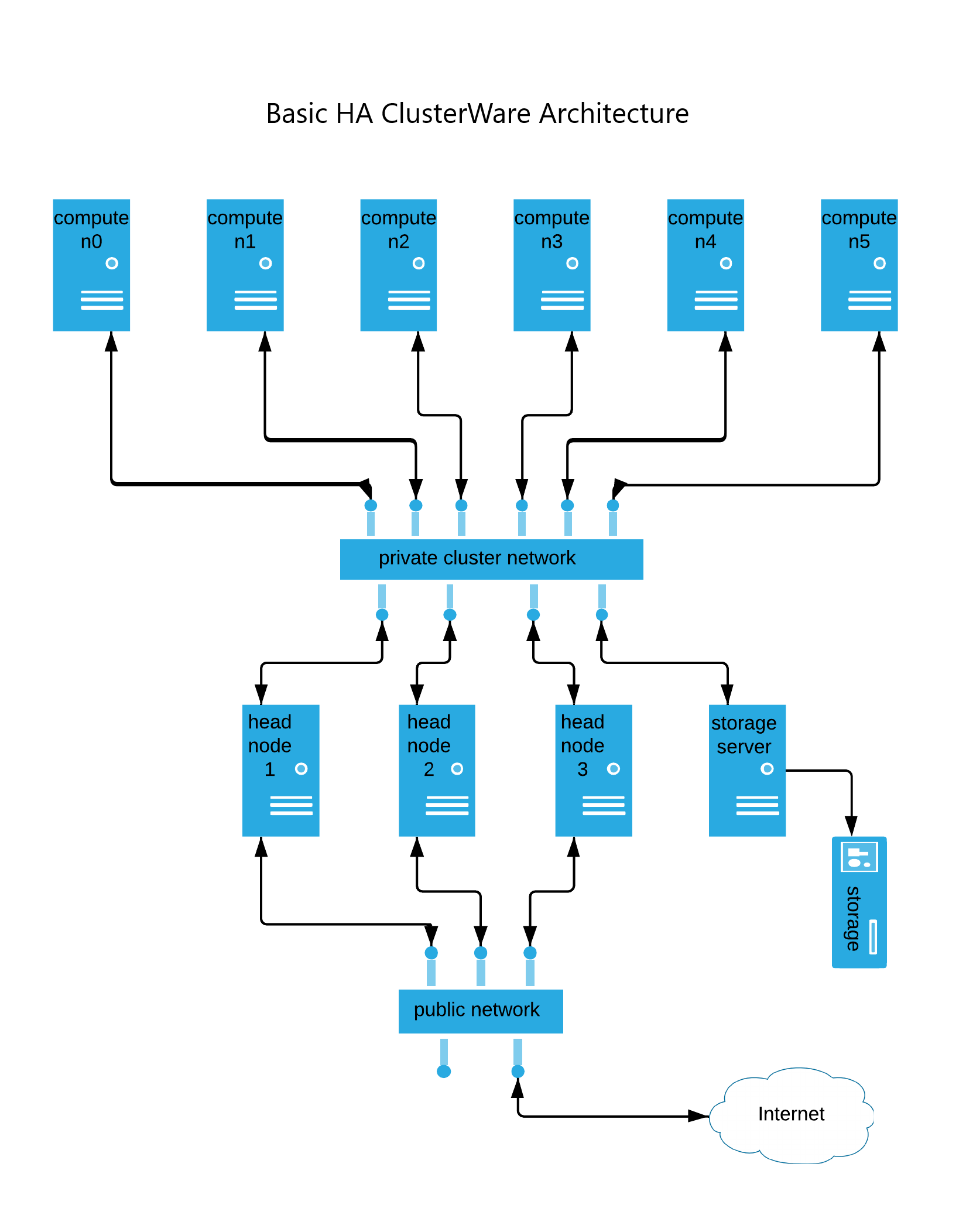
The example cluster in this diagram has three head nodes, which is the minimum for a HA cluster. The number of simultaneous head node failures ClusterWareAI tolerates scales with the total number of head nodes in the cluster. Specifically, ClusterWareAI tolerates any number of failures that is less than half the total number of head nodes in the cluster.
While the cluster is running, any head node can serve requests from compute nodes. PXE boot requests, status updates, and telemetry are automatically distributed among the live head nodes. In the event of a head node failure, compute nodes automatically rotate to the remaining live head nodes.
Note
Some network protocols, such as iSCSI, do not easily handle head node handoff. Clusters using these protocols may experience additional difficulties on head node failure.
See Managing Multiple Head Nodes for more information.
Advanced Networking#
Clusters with advanced networking include multiple network switches to control cluster traffic.
The following diagram illustrates a cluster with advanced networking and multiple public internet access options. Complex clusters may use one or more of these configuration options.
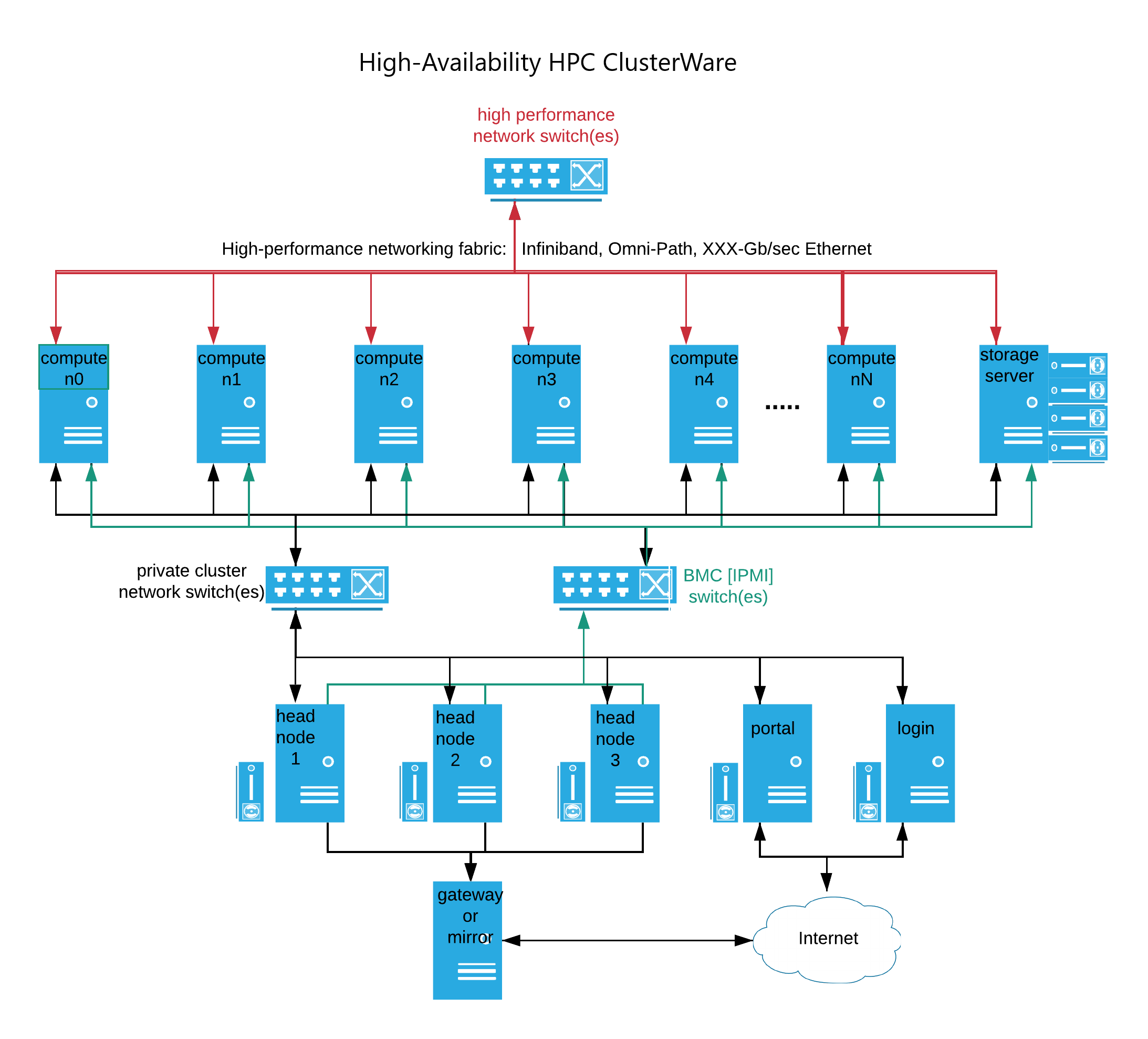
A cluster may employ high-performance networking, such as Infiniband, Omni-Path, or high-speed Ethernet, in addition to the typical 1 GB/sec or 10 GB/sec Ethernet that commonly interconnects nodes on the private cluster network. This faster network fabric typically interconnects the compute nodes and shared cluster-wide storage. The ClusterWareAI platform supports enterprise Sonic switches. See Network Switches for details on managing switches with the ClusterWareAI software.
The head node(s) commonly have IPMI access to each compute node's Base Management Controller (BMC), which provides for command line or programmatic access to the compute nodes at a more basic hardware level. The IPMI access to a node’s BMC allows for remote control of power, forcing a reboot, viewing hardware state, and more. See Compute Node Power Control for details.
Some complex clusters connect head nodes to the public internet via a gateway. The gateway allows a cluster administrator to use dnf to install or update software from internet-accessible websites. Alternatively, other complex clusters provide no head node access to the internet and keep software hosted on a cluster-internal mirror server, where the local cluster administrator has precise control over updates.
Multi-Tenant Clusters#
Note
Tenants, tenancies, and other features are available if you have paid for multi-tenant support. Contact Penguin Computing to learn more.
The ClusterWareAI platform supports multi-tenant clusters where a single super-cluster is sub-divided, isolated, and leased to customers. Within ClusterWareAI, the customers are known as tenants, and their leased sub-cluster is known as a tenancy.
The following diagram illustrates a multi-tenant cluster configured with multiple tenancies.
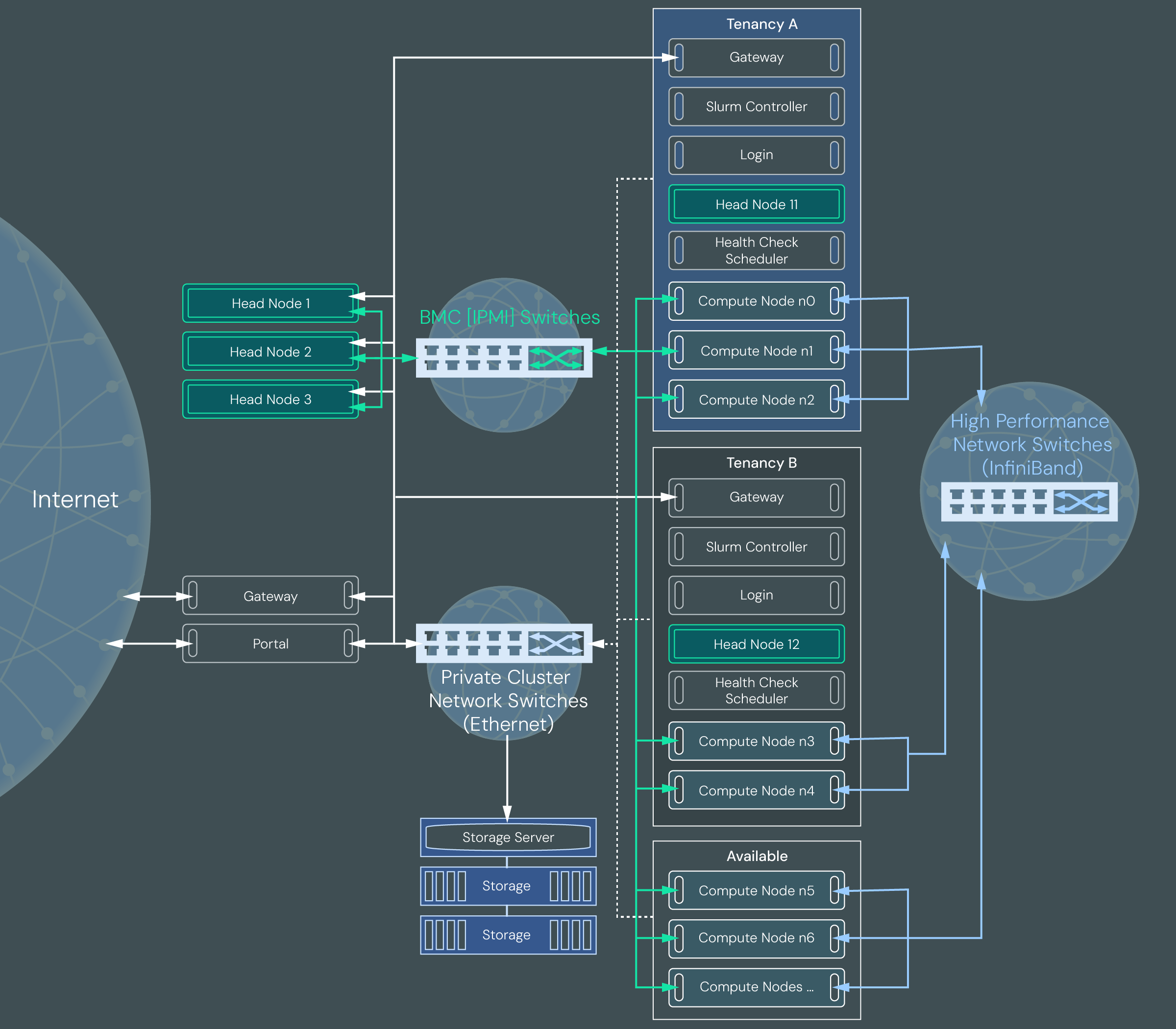
Like a cluster with advanced networking, a multi-tenant cluster uses private cluster network switches to control internet access to the super-cluster head nodes. It uses BMC switches to directly control compute node power from the super-cluster head nodes.
Compute nodes within a multi-tenant cluster that are leased to customers are contained within a tenancy, which is essentially a sub-cluster within the super-cluster. The compute nodes are connected to high performance network switches. Nodes within each tenancy are virtually separated from nodes in other tenancies using network isolation via VLANs, VXLANs, and virtual network identifiers (VNIs) for Ethernet switches and partition keys (PKeys) for InfiniBand switches. There is also a storage server shared between tenancies. Typically, the storage server is partitioned so that data from each tenancy is not available to other tenancies. The type of storage and storage vendor determine how isolated the tenancies are.
The example architecture in the diagram shows three tenancies: Available, Tenancy A, and Tenancy B.
The Available tenancy is where all healthy and ready to deploy compute nodes reside until they are assigned to a specific customer tenancy. All multi-tenant clusters have an Available tenancy.
Tenancy A and Tenancy B are Slurm-based tenancies. They contain a gateway node for internet access, a login node for user access, a Slurm node for job submissions, a head node for cluster management, and bare metal compute nodes. Users can submit jobs to the Slurm queue via a login node. The jobs are run on the compute nodes assigned to the tenancy and results are written to a partition on the storage server. The results are made available to the user on the login node.
An additional tenancy, Quarantine, is not pictured in the diagram, but is part of all multi-tenant clusters. It contains a head node and gateway node. It may contain compute nodes.
See Multi-Tenant Cluster Management to learn more about multi-tenant clusters.