

Configure LLM Server for the AI Factory Operations Agent#
The AI Factory Operations Agent allows you to ask questions about your ClusterWareAI ™ cluster via an interface in the ClusterWareAI GUI using Llama 3.2 3B. Additional configuration is required to set up the LLM server node before you can use the AI Factory Operations Agent.
The following diagram illustrates the required architecture and connections between the AI Factory Operations Agent, the ClusterWareAI software, and a browser.
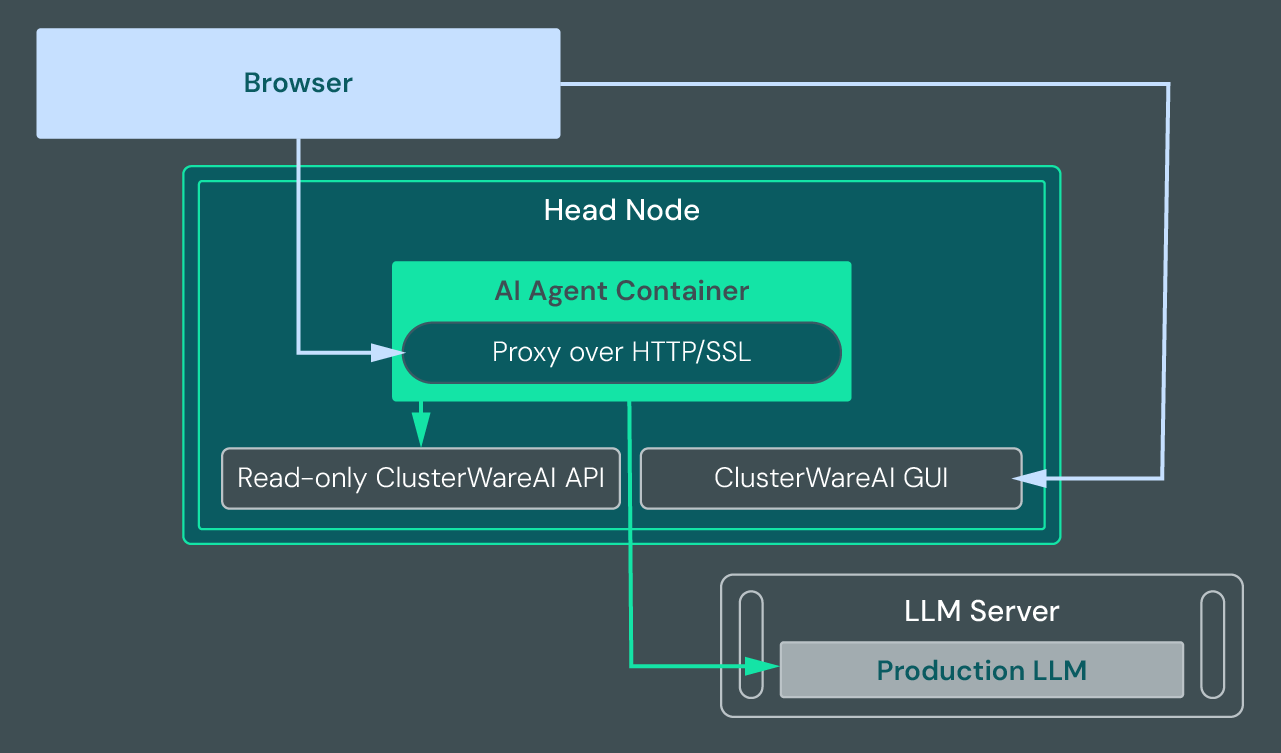
The configuration steps below set up the LLM server and enable the connection between the LLM server, the container, and the ClusterWareAI GUI.
Note
Configuring the AI Factory Operations Agent requires external internet access to download Ollama. Air-gapped customers should reach out to Penguin Computing for assistance.
Prerequisites#
Set up a bare metal or virtual machine to host the LLM server. See Required and Recommended Components for minimum and recommended specifications.
When setting up the LLM server to work with a head node in SELinux enforcing mode, ensure that the
cw_backend_tdomain is able to connect to the remote port 11434.
Configuration Steps#
Install podman on the LLM server node:
dnf install podman
Download the Ollama container from Docker or the Ollama website (https://ollama.com/download/linux). For example:
FROM docker.io/ollama/ollama:latest
Build the Ollama container:
podman build -t clusterware/ollama-llm:llama3.2-3b ollama-llm
Note
This step can take several minutes due to the image size.
Copy
ollama-llm/ollama-llm.containerto/etc/containers/systemd/ollama-llm.container.Reload the systemd service configuration:
systemctl daemon-reload
Configure the firewall to allow access to port 11434. For example:
firewall-cmd --add-port 11434/tcp; firewall-cmd --add-port 11434/tcp --permanent
Confirm the service is working locally:
[admin@llmnode ~] curl http://localhost:11434
Ollama is running
From a ClusterWareAI head node, confirm the service is working remotely:
[admin@head1 ~] curl http://<IP Address>:11434
Ollama is running
Add the LLM server location to the ClusterWareAI software via the LLM Server URL field on the Cluster > Settings page of the ClusterWareAI GUI or by running:
cw-clusterctl --set-ai-agent-config endpoint=http://<IP Address>:11434