

Health Checks#
Health checks are run on compute nodes and monitor for common issues, such as a network connectivity problem. If an issue occurs, the health check fails and alerts the ClusterWareAI ™ head node that there is a problem with a node. Health checks consist of a health check script stored in a health repo and a set of fields used to set arguments for the script, specify how often the check runs, determine how to report failures, and so on. Health checks are managed using the cw-healthctl tool, the checks API, or via the ARS Policy Page in the ClusterWareAI GUI.
There are a set of default health checks and health check scripts delivered with the ClusterWareAI software. You can also create your own custom health checks and scripts. The default health checks cover common node health issues for most cluster configurations and include checks for workload schedulers, such as Kubernetes or Slurm. The default health checks do not analyze environment-specific or node-specific concerns. For example, you could create a custom health check and script to make sure a directory is mounted in an expected location on a set of compute nodes. The default checks are tested with NVIDIA GPUs. Contact Penguin Computing if you have specific hardware configuration health check questions.
Health check labels are used for health checks that should be run together. For
example, if you have multiple health checks that apply to GPUs, but not to CPUs,
add a gpu label to these health checks and then use the gpu label when
adding health checks to GPU compute nodes.
Health checks run at certain intervals on assigned compute nodes. If you are using the auto remediation service (ARS), the assigned health checks first run when the compute node is in the Provisioning state and all checks must pass for the node to be moved to the Available state.
Tip
You can configure health checks to run on any ClusterWareAI compute node. While you can run health checks on infrastructure nodes, such as a login node, Slurm controller node, storage server, and so on, using ARS on infrastructure nodes is not recommended. Instead, monitor MQTT or journalctl for health issues on infrastructure nodes and manually resolve those problems to avoid unexpected cluster downtimes.
Flap Detection#
Some health checks failures may not indicate an actual node health problem that
requires immediate resolution. For example, the InternetConnectivity health
check makes sure the compute node can connect to the internet. A brief service
outage or disruption to the target website could cause the check to fail
temporarily. You can set up flap detection to require a health check to fail
multiple times before the issue is logged and, if using ARS, the node is moved
to the Auto Remediation state.
There are two ways to use flap detection to suppress health check failures:
Fail streak: number of subsequent failures allowed before logging the failure to MQTT and involving the remediation state machine.
Fail percentage: percent of the previous checks that can fail before logging the failure to MQTT and involving the remediation state machine.
You can set either or both values on a health check. For example, you can set a fail percentage of 20 and a fail streak of 3 on a health check. The fail percentage is computed using the previous 20 executions of the check and as such has a resolution of 5%. In this example, a failure is logged if 5 of the last 20 runs fail or if 3 runs in a row fail. Setting either value to 0 means all failures are logged immediately. See Health Check Fields for the default values that are used if fail streak and fail percentage are not explicitly set for the health check.
Health Check Data Flow#
The set of default health checks and a node status service (cw-status-updater)
are automatically installed on each compute node as part of the clusterware-node
package. The health checks assigned to a particular compute node run on a
scheduled basis. When a check runs, results are sent back to the head node via
a REST API. The node status agent monitors for changes to health checks,
including changes to the health check scripts, and pulls the new or updated
health checks via a REST API.
The cw-status-updater service periodically sends basic node status and
hardware information to the head node(s) as shown in the following diagram.
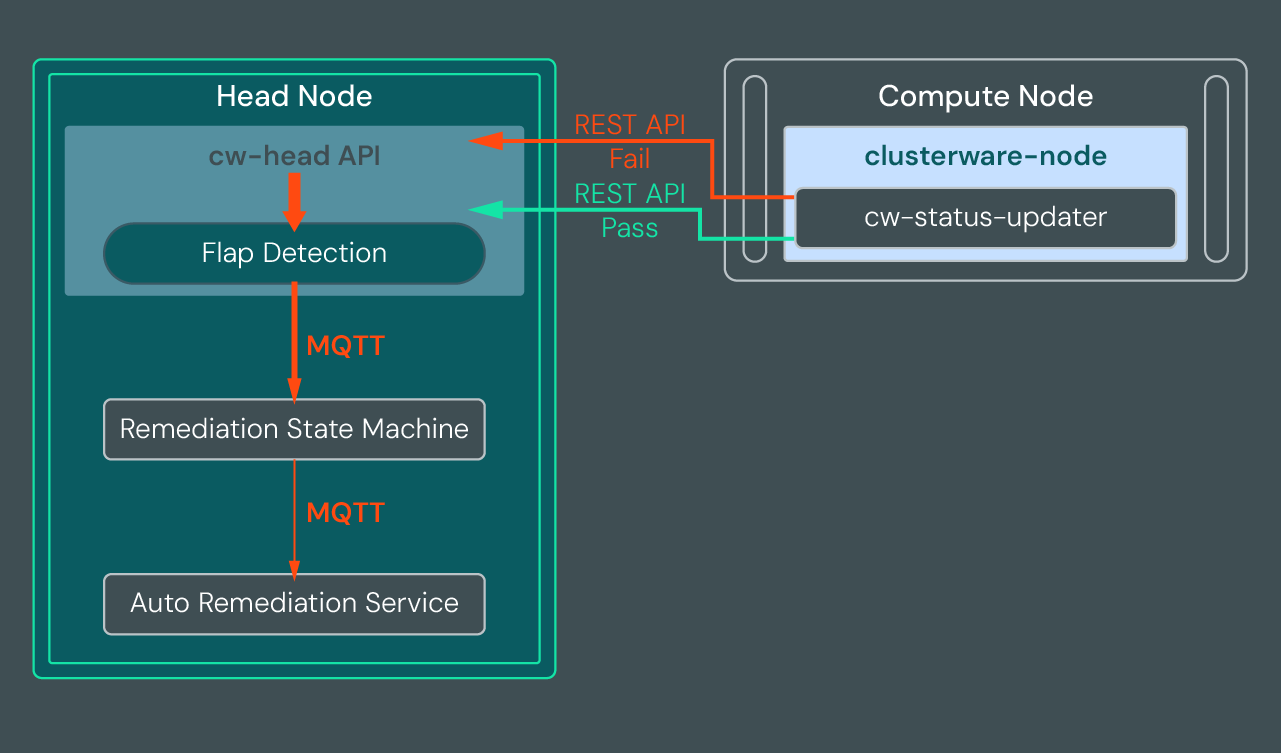
If a health check passes, the compute node sends the pass information to the node's parent head node via a REST API. To reduce traffic, success messages are accumulated and sent every five minutes by default.
If a health check fails, the compute node sends the failure information to the parent head node immediately via a REST API. All failures are processed by flap detection to determine if the number of failures is within acceptable parameters. If neither of the flap detection thresholds has been exceeded, the failure accumulates, but no further processing is performed for that health check failure until additional failures occur. If the failure is not within acceptable parameters, flap detection emits and logs an MQTT event. When using ARS, the remediation state machine reads the MQTT event and the unhealthy node is moved through the ARS State Map from the Available state to the Auto Remediation state where a remedy is selected and runs. If you are not using ARS, you can still review the MQTT message and take manual action to fix the issue.
Note
If the cw-status-updater service on a compute node stops running,
the health checks assigned to the node do not run, the node stops sending
status updates to the head node, and eventually the ClusterWareAI software
changes the node status to down. Make sure the service is running on all
nodes with health checks enabled to ensure continuous health monitoring
coverage.
Health Check Logging#
Health check passes and failures are sent to the compute node's parent head node
via the ClusterWareAI API. Failure messages are sent immediately while successes
and warnings are collected and sent after 5 minutes to reduce traffic. Health
check error messages are emitted on MQTT topic
ars/v1/cluster/events/error_detected. You can subscribe to topics using an
MQTT client. See Auditing for more details about MQTT.
You can also view health check log information directly on the compute node using journalctl by running:
journalctl --unit cw-status-updater
To watch errors as they occur, run:
journalctl --unit cw-status-updater --follow
If you are not using ARS, monitor the MQTT logs or journalctl for node health check failures so you can diagnose and fix issues quickly. If you have ARS configured for the node and a health check fails, additional logging is available as the node is automatically remediated. See ARS Logging for details.
View Health Checks#
Use the ARS Policy Page in the ClusterWareAI GUI or the cw-healthctl tool to view a list of all available health checks and associated labels. For example (output shortened):
[admin@head0 ~]$ cw-healthctl ls -l
Health Checks
  NtpSync
    command: check_ntp.py --max-offset 1
    description: Validates NTP synchronization via systemd-timesyncd or ...
    labels
      base
      default
    name: NtpSync

  NvidiaGpuHealth
    command: check_nvidia.py
    description: Comprehensive NVIDIA GPU health monitoring via ...
    interval: 30
    labels
      gpu
    name: NvidiaGpuHealth

  PciDeviceInventory
    command: check_pci.py
    description: Verifies PCI device presence, link speed, and link width ...
    interval: 300
    name: PciDeviceInventory
You can also use the cw-healthctl tool to list all checks with a specific
label:
[admin@head0 ~]$ cw-healthctl -i %gpu ls
Health Checks
  GpuConfiguration
  NvidiaGpuHealth
Including multiple labels lists all checks that have any one of those labels:
[admin@head0 ~]$ cw-healthctl -i %gpu,%infiniband ls
Health Checks
  GpuConfiguration
  InfiniBandLinkState
  InfiniBandPortErrors
  NvidiaGpuHealth
Default Node Health Checks#
A set of default health checks are installed with the ClusterWareAI software. The default health checks look for common node health problems, such as system errors, file system capacity and usage, and zombie processes. There are also default health checks for common cluster configurations, such as Slurm-specific checks, checks for InfiniBand network issues, NVIDIA or AMD GPU problems, Kubernetes-specific checks, and so on. Many default health checks have labels so that you can easily apply a group of checks to a set of similar nodes. The default health checks do not have any dependencies.
After install or update, view the list of default checks on the ARS Policy Page of the ClusterWareAI GUI or by running:
cw-healthctl ls -l
To remove all user-created or user-modified health checks and revert the ClusterWareAI software to the originally installed default health checks, run:
cw-healthctl --reset-all
Troubleshoot Health Checks#
The ClusterWareAI software cannot detect the difference between a health check failure on a compute node because the node has an issue and a health check failure because the health check did not execute properly. If you cannot diagnose a problem on a compute node, try running the health check script on the node manually to see if it succeeds. If it does not run, the health check may be missing a dependency or have other issues.