

ARS Overview Page#
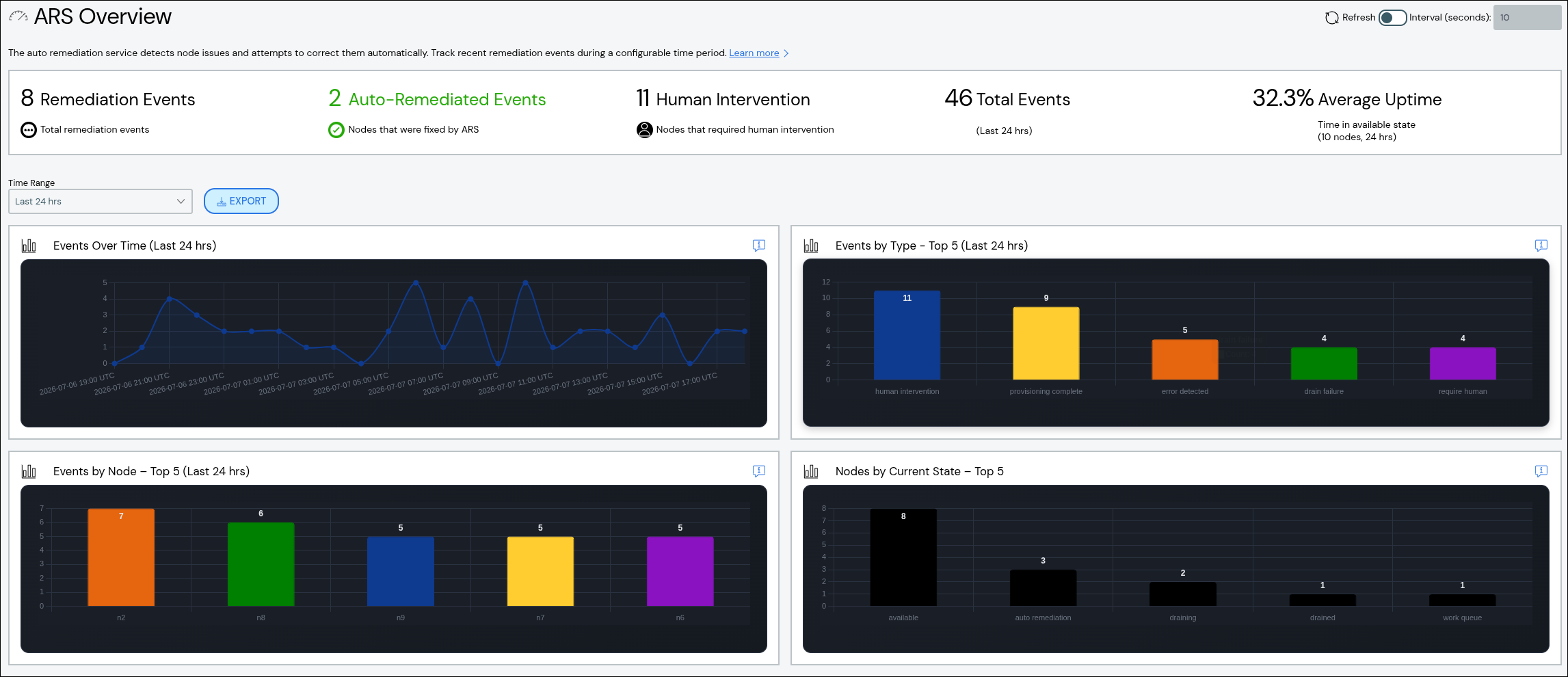
The ARS Overview page contains a summary of Auto Remediation Service (ARS) events to monitor compute node health status across the cluster. The page is available via Auto Remediation > Analytics & Insight in the left navigation panel.
Note
The ARS Overview page shows data for the current head node. In a cluster with multiple head nodes, compute nodes are split equally between head nodes. Each head node shows ARS data for the associated child compute nodes and not the entire cluster.
An event is a change in compute node state within the ARS state map. A high number of events may or may not indicate a problem with node or cluster health. For example, if you add a new rack of compute nodes to your cluster and begin monitoring those nodes with ARS, you will see a high number of events as those nodes move from the New Node state, through the Provisioning state, and into the Available state as they pass health checks. Similarly, if you bring down your cluster for planned maintenance, you may see a spike in the number of state transition events that are not related to compute node health issues. However, if you have an established cluster and do not have any expected events, a spike in chart activity on the ARS Overview page can indicate a node health issue that could require additional investigation.
By default the values shown in the summary and the charts are from the past 24 hours. You can adjust the value using the Time Range drop-down to update the summary and charts. Possible values range from the last 4 hours to the last 48 hours.
ARS Events Summary#
The top of the page shows a summary of recent events. The following summary data is available:
Remediation Events: The total number of remediation events that occurred during the selected time range. The total remediation events include compute nodes that were automatically fixed and compute nodes that entered the Work Queue state.
Auto-Remediated Events: The total number of compute nodes that were automatically fixed during the selected time range.
Human Intervention: The total number of compute nodes that were manually fixed and left the Work Queue state.
Total Events: The total number of state transition events that occurred across all configured compute nodes during the selected time range. This includes expected transitions, such as bringing a new node online, and unexpected transitions, such as an auto remediation event.
Average Uptime: The average time all compute nodes have been in the Available state over the selected time range. A low average uptime can indicate node health issues. New clusters or clusters with a lot of newly added nodes can have an artificially low average uptime until enough data is collected.
ARS Events Charts#
The charts below the summary visualize ARS event data. The following charts are available:
Events Over Time: Shows the number of events over the specified time period. A spike in the number of events could indicate an issue. Visit the ARS Event Feed Page and look at the events that occurred during the spike's time period to identify trends.
Events by Type: Shows the number of transitions for each state in the ARS state map. A high number of transitions to the Auto Remediation state could indicate an underlying issue.
Events by Node: Shows the number of events per compute node for the nodes with the most ARS state transition activity. A new node is expected to have a higher number of events while a node that was in the Available state is unlikely to have many events outside of planned maintenance or health issues.
Nodes by End State: Shows the ARS states with the highest number of nodes that ended in that state during the specified time period. A high number of nodes in the Work Queue or Auto Remediation state could indicate an issue.