
Actions Page#
The Actions page lists the actions used with the ClusterWareAI ™ Auto Remediation Service (ARS) remedies when resolving compute node health issues. The page is available via Auto Remediation > ARS Policy > Actions in the left navigation panel.
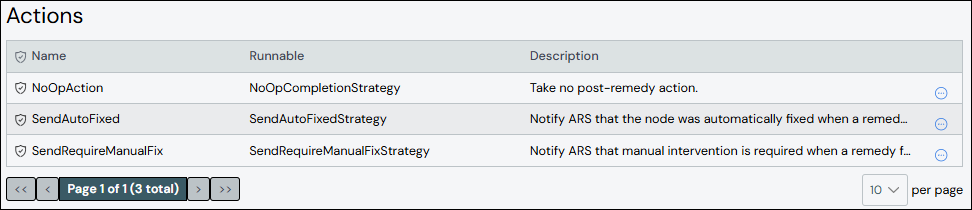
The ClusterWareAI software has a set of default actions. Use this page to modify the default actions or to add new ones based on the defaults.
Create Action#
To create an action:
Click Add Action.
Add details about the action.
Name: Required. Names must start with an alphabet character, not a number.
Description: Optional.
Runnable: Required. Use a runnable from an existing action.
Arguments: Optional. Arguments apply to the specified runnable.
Click Save.
The new action appears in the list at the top of the panel.
Edit Action#
To update an action:
Click the action name to open the action details, then click Edit Action. Alternatively, click the More menu
 on the far right of the row
and select the Edit action.
on the far right of the row
and select the Edit action.Make updates to the action.
Click Save to modify the action.
Clone Action#
Cloning an action creates a copy of an existing action with a new name and the same configuration. To clone an action:
Click the More menu
on the far right of the row and select the
Clone action. The Clone Action from window opens with the existing
action's name pre-populated in the From Action field.Enter a name for the new action in the To Action field.
Click Clone to create the new action.
(Optional) Edit the new action to change attributes, such as the arguments.
Delete Action#
To delete an action, click the More menu on the far right of
the row and select the Delete action.