

ARS State Map#
The actions required to solve node health issues often involve temporarily removing the nodes from production while performing testing, reprovisioning, and requalification. As problem nodes are identified, new nodes are added to the cluster, or nodes are transferred from one configuration to another, it's important to track the progress of each node through these processes. These processes involve multiple stages, likely spanning multiple reboots or even re-imaging. The ClusterWareAI ™ software provides a pre-configured ARS state map that tracks compute nodes with the _ars_state reserved attribute (required by ARS) through their lifecycle.
Automated transitions between states in the ARS state map are handled via the remediation state machine (RSM). The following diagram illustrates the ARS state map and possible transition points. The solid lines represent automated transitions between states, such as when an error is detected. The dotted lines represent manual state changes, such as requesting a manual drain for a node.
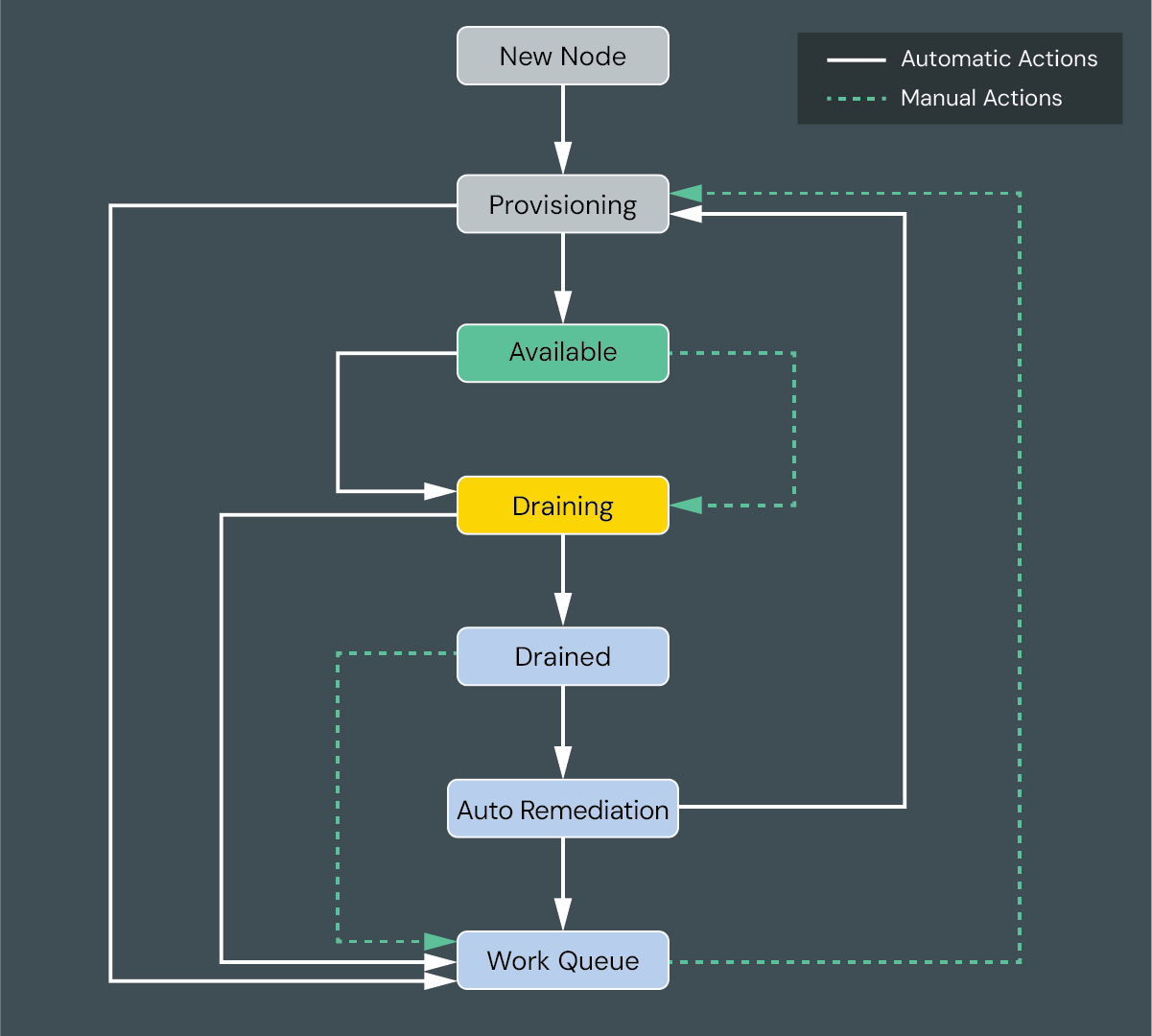
All monitored nodes start in the New Node state before they are powered on.
When a node is powered on, it moves to the Provisioning state where the ClusterWareAI software runs all of the health checks assigned to the node. Nodes remain in the Provisioning state until all health checks pass.
Once all health checks pass, a node moves to the Available state where it can run jobs. Nodes remain in this state for most of their lifespan.
If there is an issue on a node, the ClusterWareAI software works with the workload scheduler, if any, to place the node into the Draining and Drained states, allowing currently running jobs to complete before the node is taken out of service. This transition can be quick if a node is not running a job or can take some time depending on job complexity.
After a node is fully drained, it moves to the Auto Remediation state. The auto remediation service reviews the health check event data to determine the issue or issues identified, finds the best remedy to fix the issue or issues, and runs the remedy and action (if applicable).
If the issue is resolved by the automated remediation, the node moves back to the Provisioning state to be re-tested and re-deployed to the cluster. If the automated remediation did not fix the issue, the node is moved to the Work Queue state and the cluster administrator should attempt other remedies.
Tip
Use the ARS State Machine Page to monitor nodes moving through the states.