

Health Checks Page#
The Health Checks page lists the health checks used with the ClusterWareAI ™ health monitoring system (CHMS) to monitor compute node health issues. The page is available via Auto Remediation > ARS Policy > Health Checks in the left navigation panel.
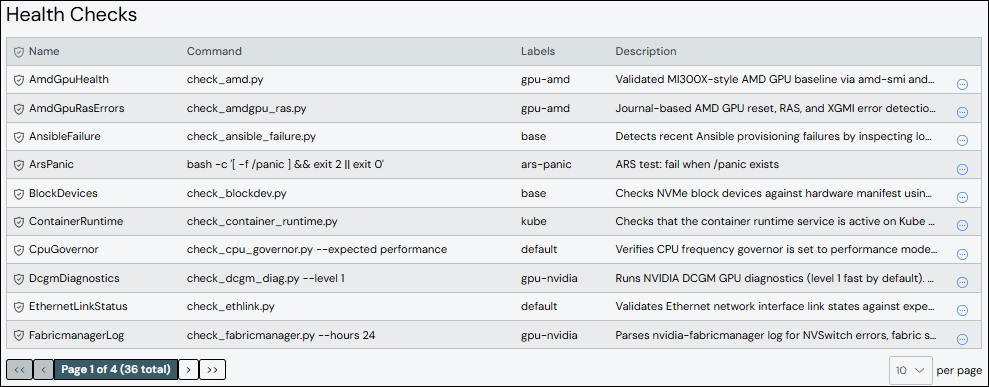
The ClusterWareAI software has a set of default health checks. Use this page to modify the default health checks or to add new ones based on the defaults.
Create Health Check#
To create a health check:
Click Add Health Check.
Add details about the health check.
Name: Required. Names must start with an alphabet character, not a number.
Command: Required. The script command and any arguments used to determine compute node health. Specify a command from an existing health check or from a custom health check.
Labels: Optional. Used to group health checks that should run on the same nodes. For example, the
kubelabel is used for health checks that apply to compute nodes using Kubernetes.
Other fields are optional, but may have default values if left unset. See Health Check Fields for details.
Click Save.
The new health check appears in the list at the top of the panel.
Edit Health Check#
To update a health check:
Click the health check name to open the health check details, then click Edit Health Check. Alternatively, click the More menu
 on
the far right of the row and select the Edit action.
on
the far right of the row and select the Edit action.Make updates to the health check.
Click Save to modify the health check.
Clone Health Check#
Cloning a health check creates a copy of an existing health check with a new name and the same configuration. To clone a health check:
Click the More menu
on the far right of the row and select the
Clone action. The Clone Check from window opens with the existing
health check's name pre-populated in the From Check field.Enter a name for the new health check in the To Check field.
Click Clone to create the new health check.
(Optional) Edit the new health check to change attributes, such as the command, interval, or severity.
Delete Health Check#
To delete a health check, click the More menu on the far right of
the row and select the Delete action.
Note
If you delete a health check that is associated with a compute node,
the health check script no longer runs even if the health check still
appears in the _ars_checks reserved attribute on the node. Even though
the check does not run on the associated node, it is recommended to remove
the deleted check from associated compute nodes to avoid confusion.